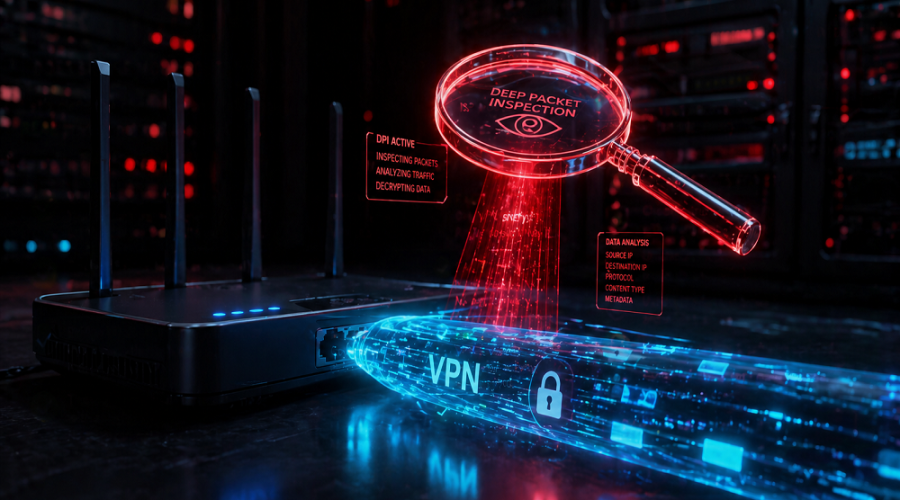
A disturbing plea recently surfaced on a privacy forum from a user in a highly oppressive regime asking: “Would equipping a router in bridge mode help conceal my use of a VPN?” It’s a high-stakes question about Deep Packet Inspection (DPI) and network topology. Let’s break down why hardware routing alone won’t save you from surveillance.
Imagine living in a country where simply seeking out neutral information online can lead to severe physical consequences. A user on Reddit recently detailed this exact nightmare scenario, asking if combining an ISP-provided modem set to “Bridge Mode” with a secondary router would add a layer of encryption to spoof their data and make their VPN usage look harmless to a hostile government.
The user’s logic is understandable: If I put a device between my PC and the government-monitored ISP modem, won’t it scramble the connection type?
The definitive, life-saving answer is: No. It will not hide your VPN usage. To understand why, we have to look closely at the Natural Language Processing (NLP) terms of networking—specifically, the difference between network topology and cryptographic payload obfuscation.
The Bridge Mode Misconception
Bridge Mode operates at Layer 2 (Data Link Layer) of the OSI model. It simply disables the NAT (Network Address Translation) and routing features of your ISP modem, passing the public IP directly to your personal router. Bridge Mode performs absolutely zero encryption or traffic masking.
Deep Packet Inspection (DPI): The Real Threat
When an authoritarian government (or a restrictive corporate firewall) wants to find out what you are doing, they don’t just look at the destination IP address; they analyze the structural metadata of the data packets leaving your house. This process is called Deep Packet Inspection (DPI).
Even if you are using a top-tier paid VPN on your PC, and running it through a bridged router, the data hitting the ISP’s infrastructure still looks distinctly like a VPN. Here is how they know:
- Cryptographic Signatures: Standard protocols like OpenVPN and WireGuard have very distinct packet headers. A DPI system recognizes these “handshakes” instantly. It doesn’t know what you are downloading, but it knows how you are downloading it.
- Port Analysis: If your router is blindly forwarding traffic on UDP Port 1194 (the default OpenVPN port), it’s a dead giveaway.
- Traffic Heuristics: State actors use machine learning and traffic correlation to analyze timing and packet sizes. A constant, heavy stream of encrypted data to a single, foreign, data-center IP address flags as an active VPN tunnel.
This level of network scrutiny is exactly why standard VPN connections get blocked in the first place.
The Solution: VPN Obfuscation (Stealth VPN)
If changing your hardware setup won’t hide your VPN, what will? You must alter the software payload so it passes DPI systems undetected. You need VPN Obfuscation.
Obfuscation (often marketed as “Stealth Mode” or using protocols like Shadowsocks, Stunnel, or obfsproxy) takes your encrypted VPN traffic and wraps it inside an additional layer of benign-looking code. Specifically, it strips away the VPN headers and makes the traffic look exactly like regular HTTPS (TLS/SSL) web browsing over TCP Port 443.
Standard VPN
Encrypts your data, but the ISP’s DPI systems can clearly see you are using a VPN protocol. Highly vulnerable to state-level blanket VPN bans.
Obfuscated VPN
Scrambles packet metadata so DPI systems see it as routine HTTPS web traffic. Critical for bypassing national firewalls (like the Great Firewall of China).
Understanding these different levels of security is crucial. It’s why securing a network goes far beyond just hiding an IP address, encompassing all 7 layers of cybersecurity.
What Should the Reddit User Actually Do?
For anyone in a high-risk environment where mere VPN usage is criminalized, standard consumer advice falls dangerously short.
- Do NOT rely on Bridge Mode for security: It’s a convenience feature for network admins, not an invisibility cloak.
- Enable Obfuscation Features: Ensure your VPN provider has dedicated “Stealth”, “Camouflage”, or Shadowsocks features built-in and active.
- Avoid Default Ports: Traffic should be forced over TCP Port 443 so it blends in with the billions of standard website requests made daily.
- Consider Tor over VPN: For accessing basic educational material in extreme threat models, utilizing the Tor network routed through an obfuscated VPN provides heavy compartmentalization.
Frequently Asked Questions
No. Bridge mode is strictly a network topology configuration (Layer 2). It prevents Double NAT by passing the public IP address directly to your secondary router, but it offers zero cryptographic benefits. Your ISP can still inspect the traffic passing through the modem.
Yes. Through Deep Packet Inspection (DPI) and metadata analysis, an ISP can identify the cryptographic signatures of common VPN protocols (like OpenVPN or WireGuard) and see the IP address of the VPN server you are connecting to, even if they cannot read the encrypted payload itself.
To hide VPN usage from hostile ISPs or state-level firewalls, you must use VPN Obfuscation techniques (like Stealth VPN, Shadowsocks, or Stunnel). These rewrite your packet headers to make encrypted VPN traffic look like normal HTTPS (web browsing) traffic.